The fork allows for importing scripts with custom made functions in it using the `import` keyword in HScript. This is useful for making your own utility script and wanting to use it's functions in multiple other scripts.
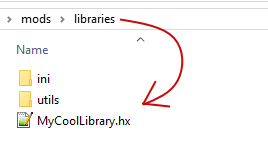
To make a library script, find the folder called "libraries" in your modpack (If it doesn't exist, then create one!) and make a new hscript inside of it.
Inside of it, lets make a class with a function that returns the square root of the number given.
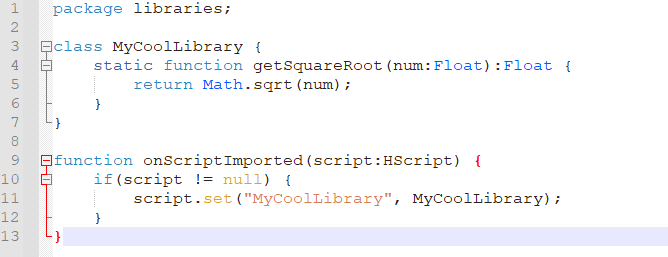
Let's break down the important parts of this script:
Now to use the library in another script, we have two options:
Both can work in this case since both of these methods call the `onScriptImported` callback. This is also why you can't just use the `importScript` function, as it doesn't call the callback.
Also please note that the `import` keyword method automatically starts in the "libraries" folder, while the `@:include` metadata method will start in the modpack itself, so you will need to append the "libraries/" part before your actual script path. This is the same case with the ".hx" extension, as the metadata will check for any text file, while the `import` keyword will append the extension automatically.


You can also do this with not just functions! You can do this with variables, custom classes, enums, etc.