This section will focus more on hscript exclusive stuff and isn't necessarily needed for creating simple scripts.
HScript is capable of doing many things that normal Haxe can, like creating enums, string interpolation, etc. Of course, not all native Haxe features are supported in HScript (for now, at least), but the Github repository for the library T-Bar Engine uses is constantly being updated with new features, so more and more things will be supported as time goes on.
USAGE ON VARIABLE: @:exampleMetadata var testVar = 0;
REGULAR USAGE: @:exampleMetadata 0;
Metadatas can be used to change how your script runs, change certain aspects when grabbing/setting properties, etc. As of version 0.2.0, hscript has 6 total metadatas to use:
@:bypassAccessor
- If used on a variable that uses "get_variable" and/or "set_variable", it will bypass these getter/setter functions and access the variable directly.
@:isVar
- If used on a variable with accessors (get_variable and/or set_variable), then it will generate a psysical field for the property, allowing the variable to be accessed inside of its accessors.
@:ignoreException
- If used and a script has an error, it will ignore the error and continue running the script.
@:noDebug
- If used, any error messages that popup in-game will be hidden. Equivelent to "luaDebugMode" from Lua. Fatal errors that show a message box will NOT be ignored.
@:noLibraries
- If used, the "import" keyword will not check for custom library scripts. It's not really useful, but it's there!
@:include(filepath:String, isAbsolute:Bool = false)
- Legacy "importScript" from older T-Bar Engine versions. If used, it will import a script (extension included) as a subscript to the parent script, and that script will only be closed once the parent script is closed. Toggle "isAbsolute" if you wanna search for a script from the root application folder.
Unlike "importScript", @:include will also call "onScriptImported" in the target script, with it's only parameter being the script that is doing the importing.
See Haxe Manual - Metadata Documentation
Using the "enum" keyword, we can make our own enums for use in our scripts, like so:
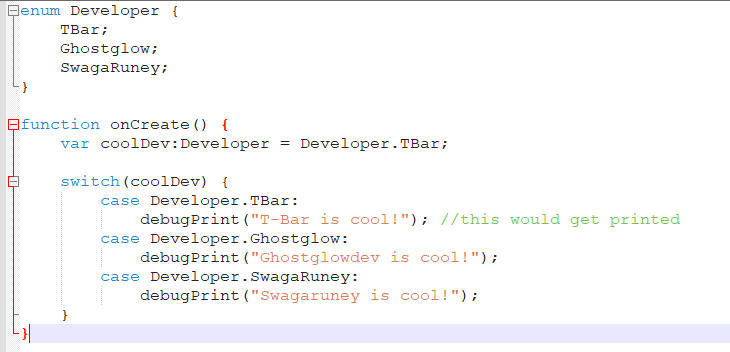
You can also use enums in "switch case" blocks for pattern matching!
See Haxe Manual - Enum Documentation
USAGE: #if(conditional) #end
Preprocessors are similar to regular "if" statements, only these can be used to check what T-Bar Engine version the script is running on, the build target, etc.
Here is an example of it in action:
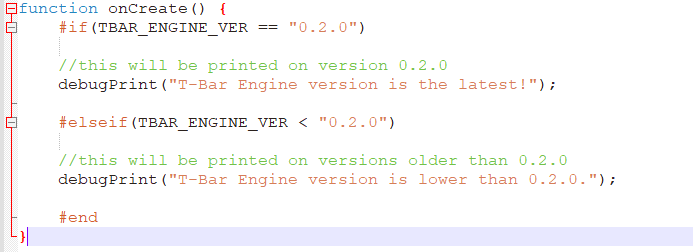
With enough knowledge, you can make your script work with multiple engines! Here is a script that will create a sprite on both T-Bar Engine and Codename Engine:
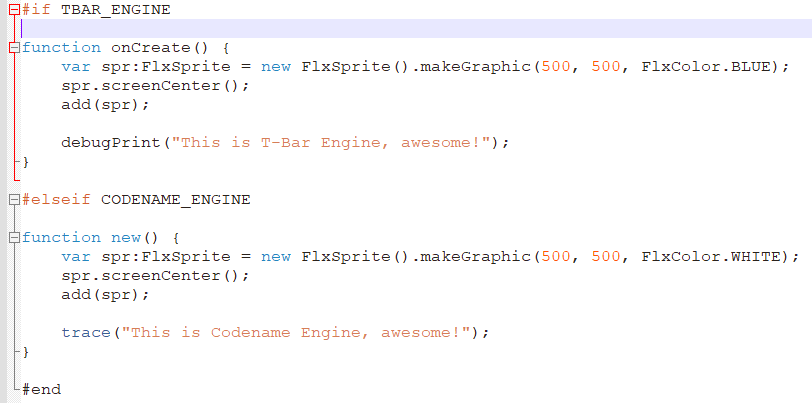
This script will create a blue box in T-Bar Engine and create a white box in Codename Engine.
Below is a list of the most important preprocessors that you can use:
- Whether the script is on T-Bar Engine, duh.
- The version of T-Bar Engine.
- The build target of your version of T-Bar Engine. Can be "windows", "linux", "browser", "android", etc.
- The state that the script was made in, like "PlayState", "MainMenuState", etc.
See Haxe Manual - Conditional Documentation
Each haxe script (and runHaxeCode) have exclusive functions that help with scripting. Some of them include:
- Set a variable with id "name" in the state's variables map.
- Returns the value of the variable with id "name".
- Removes a variable with id "name" from the state's variables map. Returns true if the action is sucessful.
- Sets a custom Lua function to ALL existing scripts and scripts created in the future. You can clear this list by setting the "FunkinLua.customFunctions" map accordingly.
- Sets a custom Lua function to script "lua". If "lua" is not set and is ran through runHaxeCode, the function will be set to the parent script. Returns true if the action is sucessful.
- __type__ is a special function that returns the type of "obj" as a String. This is an HScript equivelant to "$type".