All versions of T-Bar Engine have hscript, meaning that you can make custom haxe scripts as an alternative to Lua scripts.
For the sake of having as much freedom as possible, T-Bar Engine uses HScript-improved as it's hscript library (I.E. the same haxe library Codename Engine uses!) as opposed to base Psych's HScript-Iris. While this does trade in some Hscript-Iris exclusive features (like typedef support), HScript-improved more than makes up for, like Haxe 4.3 exclusive syntax, string interpolation, scripted classes, etc.
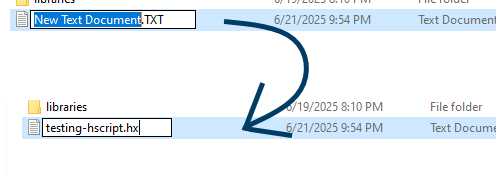
Making a haxe script is just as easy as making a Lua script, simply make a new text document in the scripts folder or a song folder and rename it to have the `.hx` extension.
Haxe scripts work similar to Lua scripts, as in it uses callbacks to run code. For example:
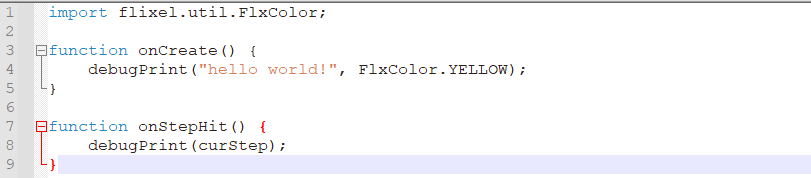
When the script is first created, the callback `onCreate()` is ran, and (presuming this script is a song script) will run `onStepHit()` everytime the song changes, well... step.
The stuff outside of the callbacks, like the `import flixel.util.FlxColor;`, can be used to run code RIGHT when the script is executed, even before onCreate. The `import` function is the equivelent to `addHaxeLibrary` in Lua, where you can import haxe classes.
NOTE: In the example, FlxColor is being imported, but keep in mind that FlxColor is apart of the default imports, so you don't really need to import it. It's only used as an example.
That is the basic rundown of haxe scripts. Haxe scripts are recommended for the majority of the fork's stuff, like state scripting, global scripts, etc.
If you wanna learn more about making your own states in your modpack, please check the State Scripts page of the documentation.